"Each unit of engineering work should make subsequent units easier — not harder."
Stop reinventing the wheel every session
Each unit of engineering work should make subsequent units easier — not harder.
A complete operating system for Claude Code — skills, agents, and quality gates that activate automatically.
Every solved problem becomes searchable institutional knowledge. Future plans consult past solutions automatically.
15+ repos analyzed through source code inspection. Best patterns absorbed, bad patterns documented and rejected.
A full development lifecycle toolkit, installed as a single plugin
Workflow modules: TDD, systematic debugging, brainstorming, wave orchestration, swarm coordination, knowledge compounding, and more.
Specialized subprocesses for security audits, performance reviews, code review, research, architecture analysis. Each gets a fresh 200K context.
All commands merged into skills in v3.2. Every skill is a direct entry point — /brainstorming, /ship-pipeline, /review-swarm, and more.
Session start bootstrap, context monitoring, prompt injection guard, ship loop exit guard, task completion, teammate idle detection.
Four execution modes for every situation
Full-cycle pipeline with checkpoints between every stage. Human in the loop at every gate. Best for guided feature development.
Zero checkpoints, fire-and-forget. Plans, executes via team-lead agent, iteratively reviews (3 cycles), and opens a PR automatically.
For small, well-understood changes under 3 files. Write a failing test, fix it, verify, commit. TDD in its purest form.
External bash loop that spawns a fresh 200K context per iteration. State persists via git. Handles context exhaustion gracefully.
| Pipeline | Checkpoints | Review | Best For |
|---|---|---|---|
/build-pipeline | Between every stage | Single pass | Human-guided features |
/ship-pipeline | None | 3 iterative cycles | Single-context fire-and-forget |
ship.sh | None | 3 iterative cycles | Large features, context exhaustion |
/quick-fix | None | None | Trivial changes (< 3 files) |
Every feature follows a structured flow from idea to shipped code
Load context, review status, understand what's in flight
/project-statusBrainstorm 3+ options, present tradeoffs, get human approval
/brainstormingBreak into bite-sized tasks with file paths and test strategies
/deepen-planExecute with TDD. Verify with evidence. Dispatch review agents
/orchestrateMerge, update docs, capture learnings for next session
/session-wrapNot everything needs the full flow. Bug fixes, typos, and config changes use a lightweight workflow: write a failing test, fix it, verify, commit. The boundary is clear — if you're touching 4+ files or unsure of the approach, use the full workflow.
Four coordination patterns — each designed for a specific type of work
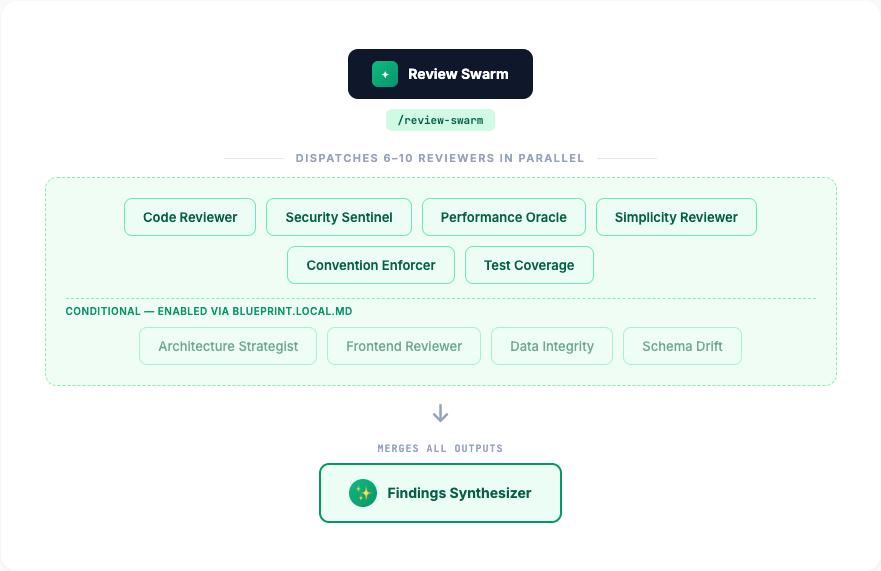
6-10 specialized reviewers (security, performance, architecture, code quality, test coverage, data integrity) dispatched in parallel. A findings-synthesizer merges into a unified P1/P2/P3 report.

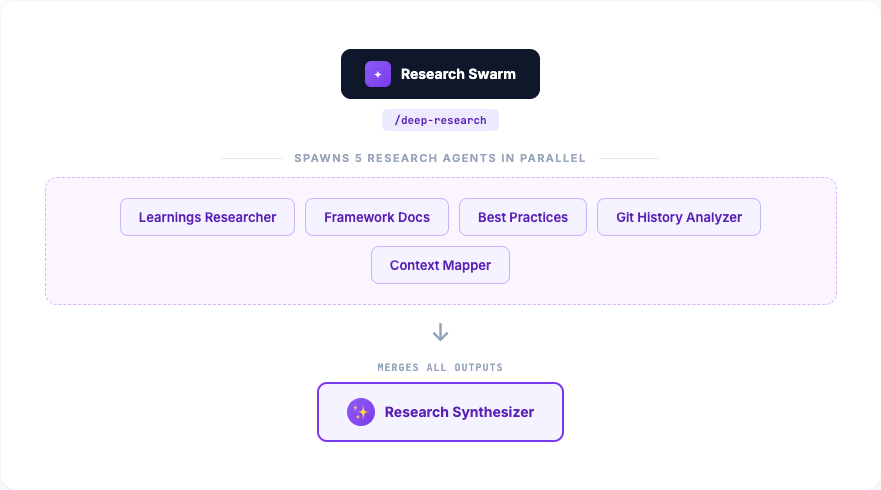
5 agents research in parallel: best practices, git history, framework docs, codebase context, and past solutions. A research-synthesizer consolidates into one brief.

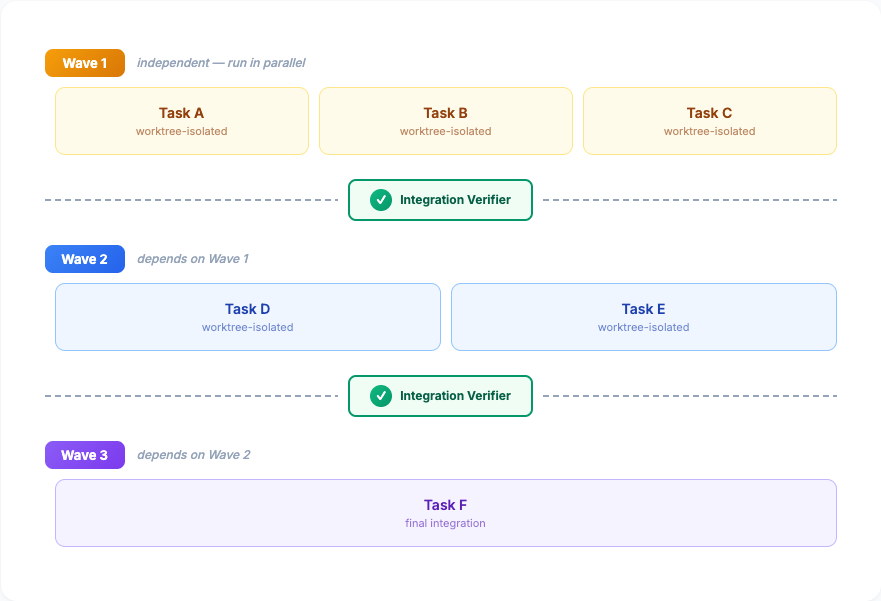
Groups tasks by dependency into waves. Parallel within waves via worktree-isolated subagents. An integration-verifier validates between waves.

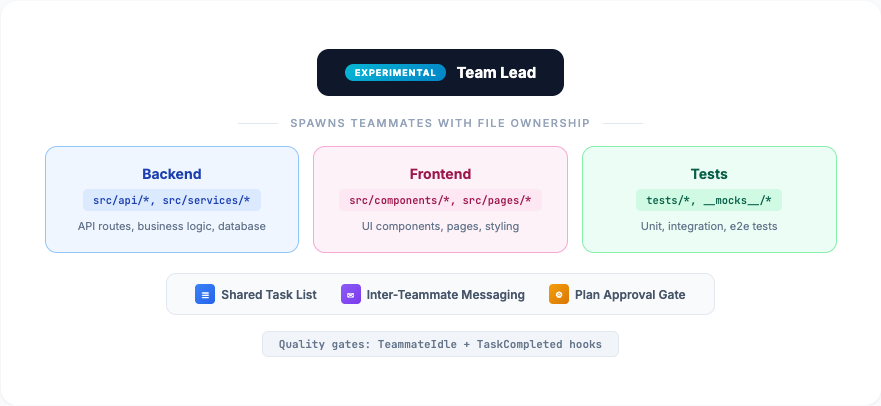
Fully independent Claude Code instances with a shared task list and messaging. Unlike swarms (read-only), Agent Teams are peers that discuss, divide files, and coordinate.
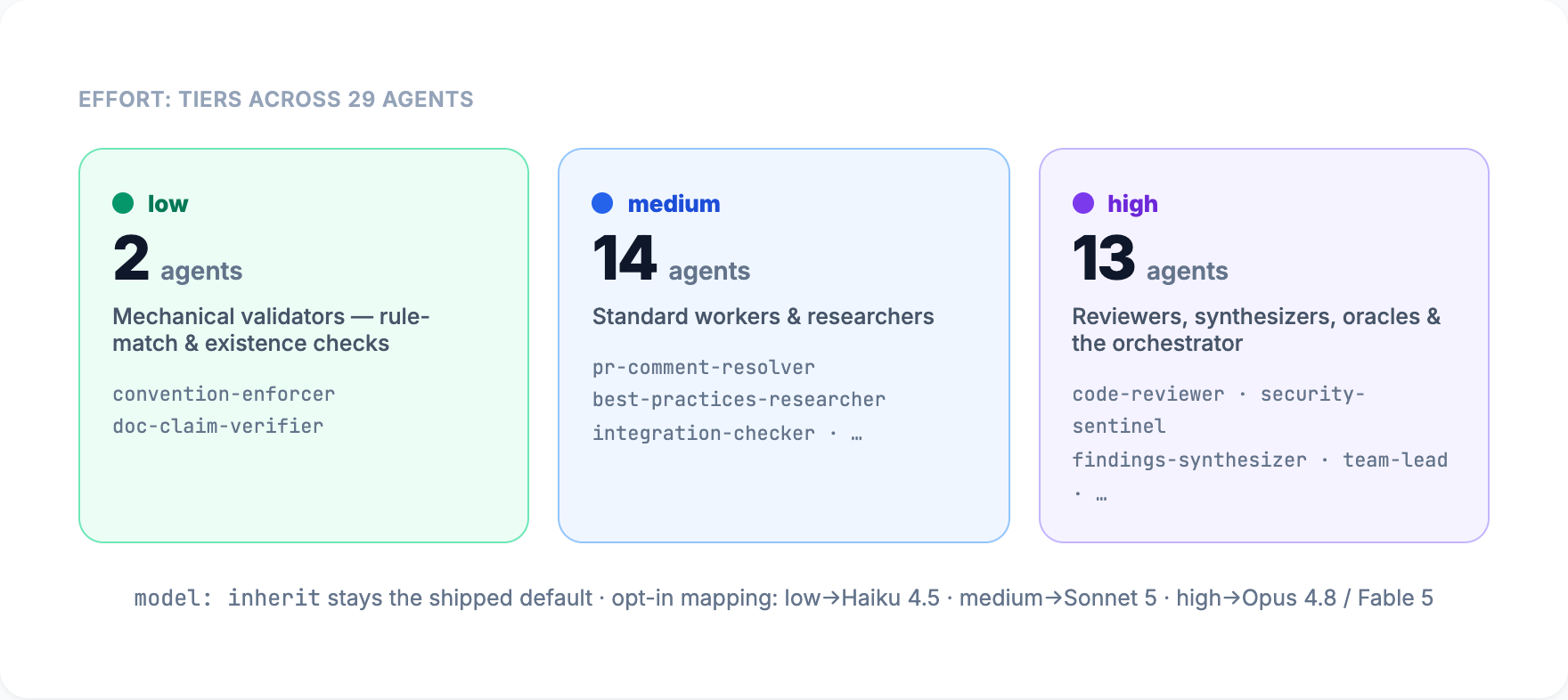
26 specialized agents organized into 4 teams
Two-layer defense against context exhaustion and premature exit
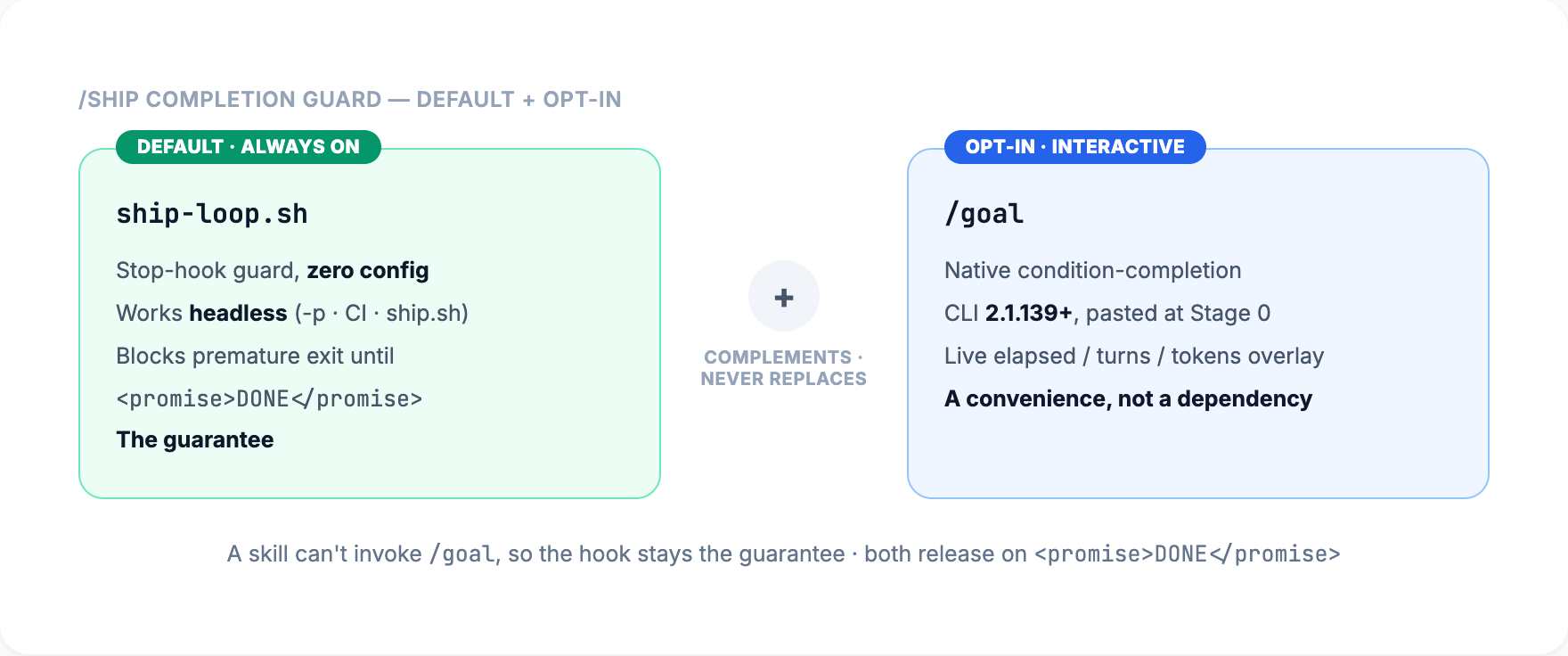
Large features can exhaust Claude's 200K context window. When that happens, most setups just stop. Blueprint has two redundant loop mechanisms that keep work going — one inside the session, one outside — each solving a different failure mode.
Runs outside Claude in your terminal. Spawns a fresh Claude process per iteration — each gets a clean 200K context window. State persists through git commits and plan files. Max 10 iterations (configurable with --max).
Runs inside Claude's session as a Stop hook. When Claude tries to exit before work is complete, the hook blocks the exit and re-injects the original prompt. Same session, growing context. Max 5 internal retries.
scripts/ship.sh runs in your terminal as a bash loop. Each iteration runs claude --print as a completely fresh process. Work accumulates via git commits — the plan file stays on disk, changes are committed, and each new Claude instance picks up where the last left off. Includes a braille spinner with 8-stage detection showing what stage the pipeline is in.
ship-loop.sh is a Stop hook that fires when Claude tries to end the session. It checks for <promise>DONE</promise> in the last output. If missing, it blocks the exit and re-injects the original prompt as a new message — Claude continues working in the same session. Session-isolated by branch name to prevent cross-contamination.
Both loops gate on the same signal: <promise>DONE</promise>. This isn't a string Claude casually outputs — the /ship-pipeline skill only emits it after all 7 pipeline stages complete (requirements → plan → deepen → execute → review → compound → ship). No false positives.
Between iterations, state persists through multiple channels: git commits (code changes), plan files (task progress), progress tracking (.claude/ship-progress.local.md), and iteration logs (.claude/ship-logs/). Each new process reads the current state of the repo and continues from where the last one stopped.
Five non-negotiable checkpoints enforced automatically
brainstorming
test-driven-development
systematic-debugging
verification-before-completion
requesting-code-review
Every solved problem makes the next one easier
Every solved problem becomes a structured, searchable document in docs/solutions/. Your project accumulates institutional knowledge over time.
Planning skills like /brainstorming and /deep-research automatically search past solutions before starting new work. No manual lookup needed.
The /session-wrap skill captures learnings automatically at the end of every session. Knowledge compounds without extra work from you.
Pick up exactly where you left off — every time
/resume-session loads full context
Install once, available in every project
1 Plugin Marketplace
2 Or One-Line Install
3 Set Up Your Project
Run /plugin install claude-code-blueprint inside any Claude Code session to re-fetch the latest version from GitHub. Restart your session after updating.
Every skill in the Blueprint, organized by category
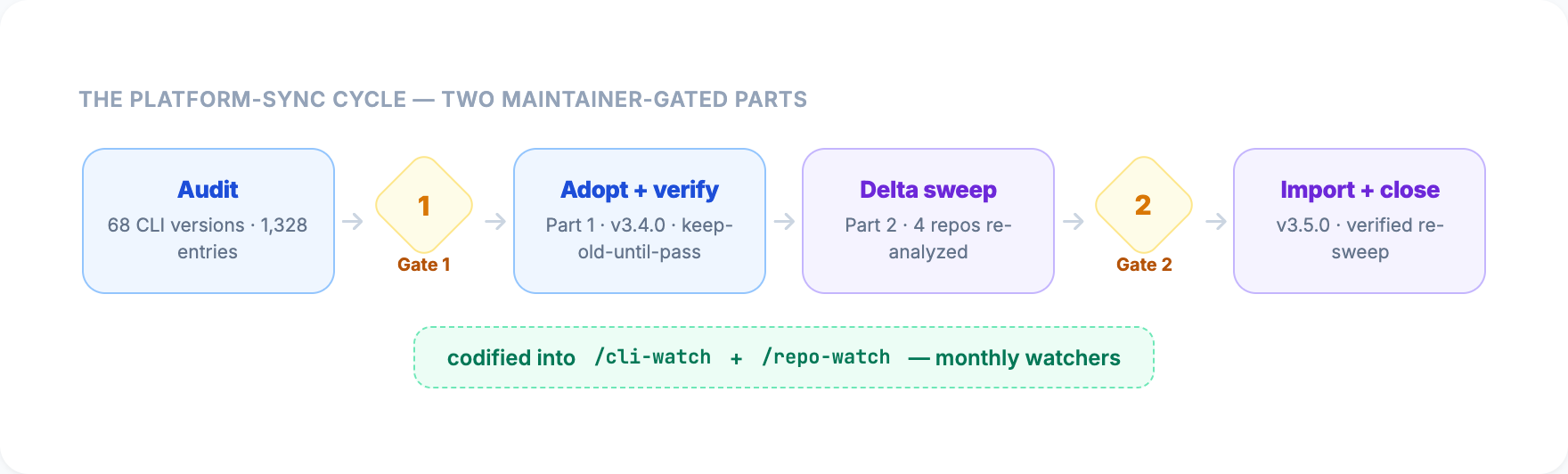
16+ repos analyzed through direct source code inspection
| Repo / Tool | Stars | Verdict |
|---|---|---|
| gstack | 22K | 15 patterns adopted |
| oh-my-claudecode | 21.9K | 3 patterns adopted |
| GSD | 24.7K | 4 patterns adopted |
| Superpowers | 71K | Patterns adopted |
| Compound Eng. | 9.9K | Patterns adopted |
| Everything CC | 50K+ | Reference |
| UI/UX Pro Max | 37K | Reference |
| claude-mem | 39.7K | Import nothing |
| claude-squad | 6.5K | Import nothing |
| Ralph | 13.5K | Pattern adopted |
| Ralphy | 2.5K | Pattern adopted |
"Import nothing is a feature, not a failure. Sometimes the right answer after deep analysis is to change nothing."
Framework audit — 18 fixes across hooks, skills, templates, and docs
task-completed.js no longer false-positives on TypeScript files. Python syntax checks now use python3 (was silently skipped on macOS).
35 occurrences of old command names (/start, /wrap, /planning, etc.) updated across 13 files. Every new project now gets correct skill references.
render-graphs.js upgraded to execFileSync. find-polluter.sh word-splitting bug fixed for paths with spaces.
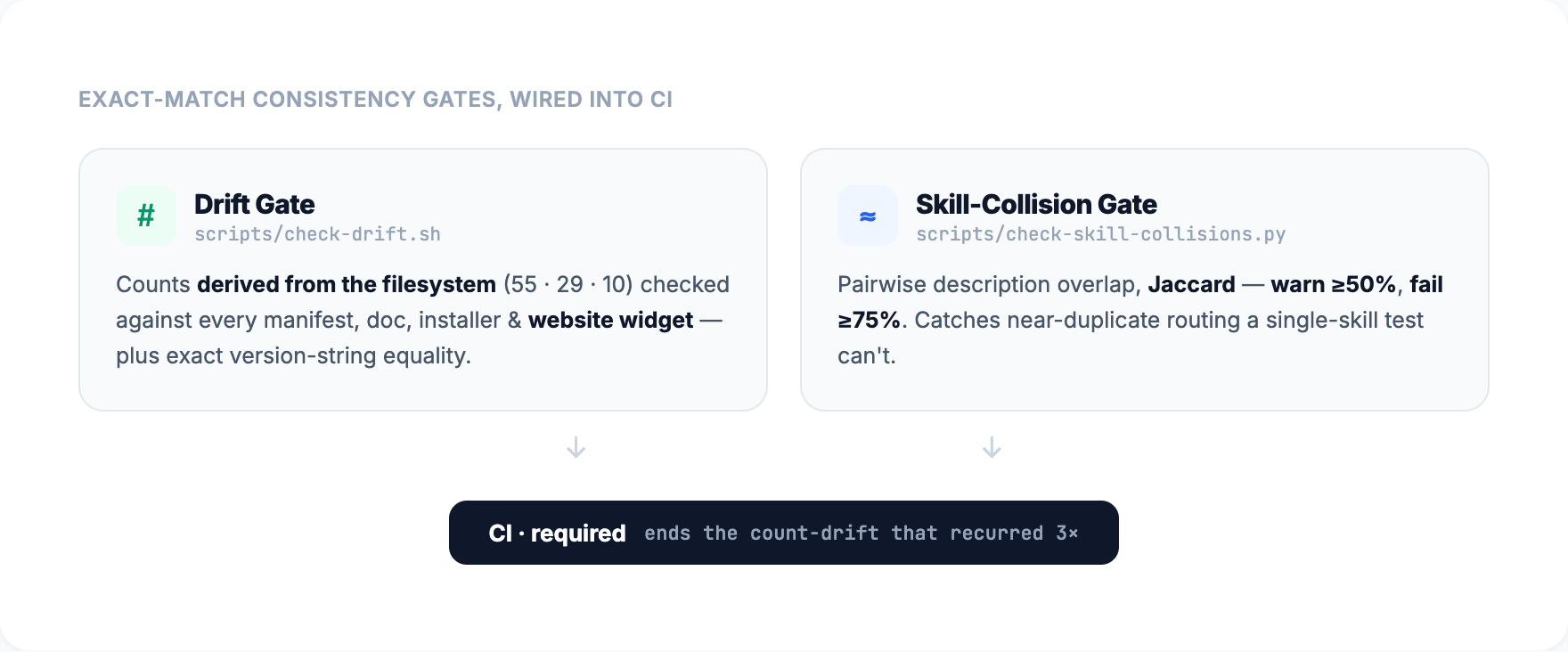
All manifests, installer, and docs now report consistent version numbers. README TOC anchor fixed. Team count corrected across website pages.
Commands merged into skills — 53 skills, zero commands
All 27 commands are now skills. 53 total skills, zero commands. Skills are the direct entry point — no sandbox loading gap.
Skill descriptions follow Anthropic's guidelines: pushy triggers (activate proactively) and negative triggers (avoid false matches).
/build → /build-pipeline, /ship → /ship-pipeline, /planning → /brainstorming, /quick → /quick-fix, /start → /project-start, /status → /project-status, /wrap → /session-wrap, /compound → /knowledge-compounding, /debug → /systematic-debugging, /update → /plugin-update, /team → /team-execution, /review → /requesting-code-review, /ideate → /ideation, /map → /codebase-mapping, /backlog → /backlog-triage, /health → /health-check, /pause → /pause-checkpoint, /resume → /resume-session, /pr → /pr-workflow, /changelog → /changelog-generation, /deepen → /deepen-plan
Every skill is a first-class entry point. No wrapper commands, no indirection. Type the skill name and go. Auto-creates MEMORY.md on first session start.
Blueprint became a native Claude Code plugin
Install once, available in every project. Zero engine files in your git history.
Project files (CLAUDE.md, docs/, BACKLOG.md) created on demand per project.
Transition v2.x in-project files to plugin mode. Removes engine files, keeps project state.
Cross-references use Skill tool instead of file paths. Required by Claude Code's plugin sandbox.
/project-start to scaffold the docs structure. Your existing code is never touched.
blueprint.local.md.
/ship-pipeline is the fully autonomous pipeline — zero checkpoints, fire-and-forget. It plans, researches, executes via a dedicated team-lead agent, iteratively reviews (3 cycles), and opens a PR. Use it for well-defined features. For large features that may exhaust context, use scripts/ship.sh from your terminal.
ship-loop.sh Stop hook blocks premature exit (max 5 retries, same context). Outside a session, scripts/ship.sh spawns fresh Claude processes — each gets a clean 200K context, state persists via git.
/knowledge-compounding saves it as a structured document in docs/solutions/. Future /brainstorming and /deep-research skills automatically search this directory before starting new work. Your project builds institutional knowledge over time.